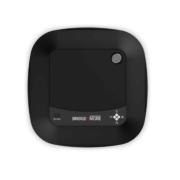
blogpost | Page 19 of 26 | Help side for Bridge+More by Bridge Company

2.09 Unique Feature – You control if next bridge hands are ejected when you insert current Hands

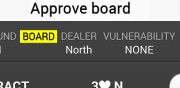
Unique Feature – You control if the next bridge hands are ejected when you insert current Hands. To illustrate how advanced our solution is and how detailed the process control we offer is – look at the simple option that let you decide if next bridge hands should be ejected or not if or when the players (North) is behind with the registration of the previous board’s bid (bids if chosen) and results (meaning the current hands have been played).

1.02 Game flow and play principles

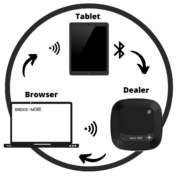
Principles Game Flow – A tournament is set up via a browser access to the B+M cloud based server. Players are also selected via a browser access to the B+M cloud based server or at the tablet before the game start (or during the game). How to set up the Tournament and the Players please see ” Guide Handling and Playing a tournament”. When a Tournament have been created  the tournament must be selected on the tablet. How to set up the tablet and B+M Dealer and select a tournament please see ” Guide to Handling and playing on the tablet”

Principles – Playing. The tablet receives the game instructions and sends the card dealing information to the B+M Dealer.

How to test the dealer – multiple test options

6.01 How to prepare bridge games with the Bridge+More tablet

To be able to play a tournament of bridge you need to ensure three things: That the dealer and tablet have established a WiFI connection; and that the dealer and tablet have established a Bluetooth connection; and that you have created and then selected the tournament you want to play.

Language – bridge translations

2.05 Unique Feature – Focus on playing – don’t be distracted by details like entering results

Unique Feature – Continue to play and don’t be delayed by details entered on the tablet. As soon the first player takes their hand, the dealer will show the board number of the cards about to be played.

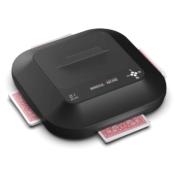
How to test the bridge dealer – Dealer test of the card gap

The Bridge+More bridge Dealer can be tested with a number of tests – The bridge dealer tests are found in the Dealer menu – click at these texts (illustration – your details will be different)

4.03 How to open and close the lid on the Select Dealer

Thanks for your visit

 Still time to register for our newsletter?


Would you like to leave a quick comment ?

Thanks for your visit

 Still time to register for our newsletter?


Would you like to leave a quick comment ?

Like to register for our newsletter?

No spamming and one click to unsubscribe