Dealer Test | Help side for Bridge+More by Bridge Company

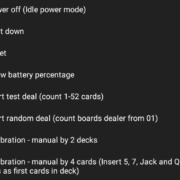
4.06 How to manually do a thorough calibration of the bridge dealer with 52 cards? (Advanced)

How to manually do a thorough calibration of the bridge dealer with 52 cards? (Advanced)

4.13 How to you use the Dealer card gap adjustment feature

How to use the Dealer’s card gap adjustment feature – on the Select+ 4, Select+ and the Premium dealer (Classic dealer can be upgraded)

How to Remove an old app version?

Ensure Optimal Performance: Uninstall old Bridge+More app versions and update to the latest via official platforms for the best experience.

How to Uninstall an App from the Phone or Tablet?

Uninstalling Apps Made Easy: Learn how to quickly remove apps on Android, iOS, and other devices with simple step-by-step instructions.

4.xx How to keep the Bridge+More dealer’s battery charged – power safe options?

How to keep the Bridge+More dealer’s battery charged – besides the two automatic turn off features battery charge will depend primarily on the power off method – read more …………

4.07 How to do a fast calibration of the bridge dealer with 4 cards? (Basic)

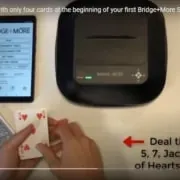
How to do a fast calibration of the bridge dealer with only 4 cards? (Basic)

4.11 How to reset the Bridge+More dealer?

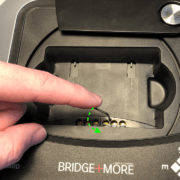
If you need to reset the Bridge+More dealer it is easy as you have several options:

How to import card distributions (hands) into your Bridge+More solution (Basic) (copy)

The Bridge+More solution is a complete solution and creates all the hands – you need – but you might want to play or import a specific card distribution. Therefore, the Bridge+More solution offers multiple import options and the import feature reads all known Bridge file formats.

How to avoid misuse of reference games – how we protect you against other’s misuse of reference sources

How to avoid misuse of reference games – how we protect you against other’s misuse of reference sources

How to set the dealer to deal random cards

How to set the dealer to deal random cards – it is actually easy to do. Start dealing with random cards is done with the power button.

Thanks for your visit

 Still time to register for our newsletter?


Would you like to leave a quick comment ?

Thanks for your visit

 Still time to register for our newsletter?


Would you like to leave a quick comment ?

Like to register for our newsletter?

No spamming and one click to unsubscribe